> ## Documentation Index
> Fetch the complete documentation index at: https://craftspace.mintlify.site/llms.txt
> Use this file to discover all available pages before exploring further.
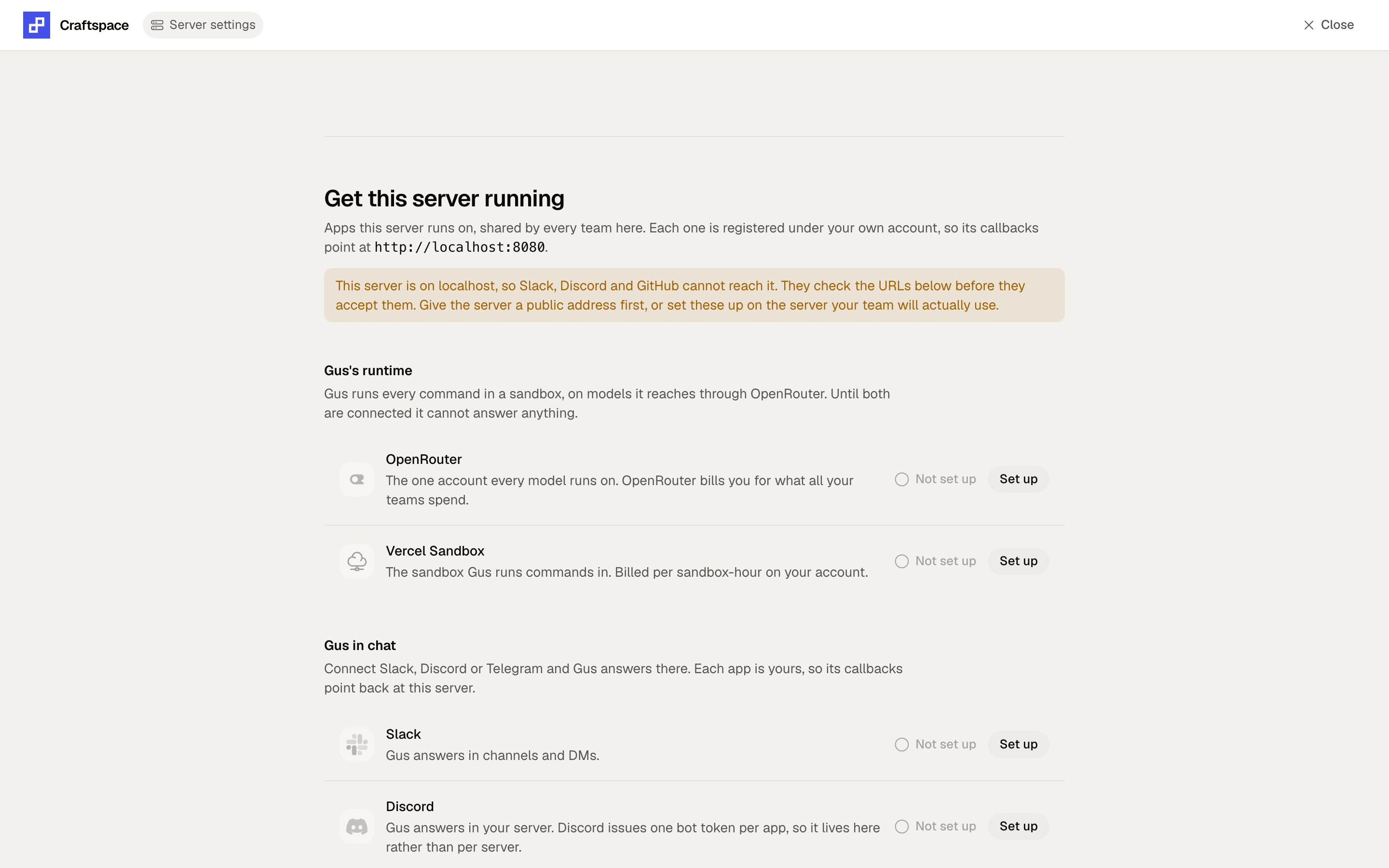
# Server settings
> The screen where an install is actually configured.
Server settings are shared by every team on the install, so only the **install owner** can open them. That
is the first account that ever signed in.
 Handing it over has no screen yet. It is one row:
`update install_secret set value = '' where name = 'installOwnerAccountId'`, read fresh per
request, so no restart is needed.
## Required
Both sit under **Gus's runtime**, and Gus cannot answer anything until they are both connected.
One key that every team on this install runs on. Paste a plain inference key from
[openrouter.ai/settings/keys](https://openrouter.ai/settings/keys).
A **provisioning or management key will be refused**. It answers the check with a 200 and then fails
every actual answer with `401 User not found`, so the check reads `is_provisioning_key` off the same
payload and stops it there. A key already at zero remaining is refused too.
The optional cap is a per-team spending ceiling in dollars, enforced before a model is called. Blank or
`0` means no ceiling, which is what most self-hosted installs want. Because the dialog treats a blank
field as "keep what is there", `0` is how you clear a cap you already set.
Token, team id and project id. Gus runs its coding harness in a sandbox and has no other runtime, so
without these the rest of the app works and Gus reports itself unconfigured.
## Gus in chat, and the rest
Each one is registered under your own account, so its callbacks point at your install rather than at
somebody else's.
| App | What it unlocks | Without it |
| ---------- | -------------------------------------------------- | --------------------------------------------------- |
| Slack | Gus in a Slack workspace | The Slack row reads "not set up on this deployment" |
| Discord | Gus in a Discord server | Same |
| Telegram | Gus in a Telegram DM | Same |
| GitHub App | Brain as Code: cloning repos, writing context back | The repo picker stays empty |
Register the callback URLs against **your** hostname. Slack refuses an `http` redirect URL outright, so an
install on `localhost` cannot complete the Slack setup at all. Give the server a public address first.
## Storage
Read-only here. `FILE_STORAGE` is set when the server starts, and files already saved keep serving from
wherever they were written.
Handing it over has no screen yet. It is one row:
`update install_secret set value = '' where name = 'installOwnerAccountId'`, read fresh per
request, so no restart is needed.
## Required
Both sit under **Gus's runtime**, and Gus cannot answer anything until they are both connected.
One key that every team on this install runs on. Paste a plain inference key from
[openrouter.ai/settings/keys](https://openrouter.ai/settings/keys).
A **provisioning or management key will be refused**. It answers the check with a 200 and then fails
every actual answer with `401 User not found`, so the check reads `is_provisioning_key` off the same
payload and stops it there. A key already at zero remaining is refused too.
The optional cap is a per-team spending ceiling in dollars, enforced before a model is called. Blank or
`0` means no ceiling, which is what most self-hosted installs want. Because the dialog treats a blank
field as "keep what is there", `0` is how you clear a cap you already set.
Token, team id and project id. Gus runs its coding harness in a sandbox and has no other runtime, so
without these the rest of the app works and Gus reports itself unconfigured.
## Gus in chat, and the rest
Each one is registered under your own account, so its callbacks point at your install rather than at
somebody else's.
| App | What it unlocks | Without it |
| ---------- | -------------------------------------------------- | --------------------------------------------------- |
| Slack | Gus in a Slack workspace | The Slack row reads "not set up on this deployment" |
| Discord | Gus in a Discord server | Same |
| Telegram | Gus in a Telegram DM | Same |
| GitHub App | Brain as Code: cloning repos, writing context back | The repo picker stays empty |
Register the callback URLs against **your** hostname. Slack refuses an `http` redirect URL outright, so an
install on `localhost` cannot complete the Slack setup at all. Give the server a public address first.
## Storage
Read-only here. `FILE_STORAGE` is set when the server starts, and files already saved keep serving from
wherever they were written.